

Run Your First Eval
This page takes you from nothing to a scored run. You need model-eval access on your team (see Get access) and an API key from a model provider.
1. Install the package
Section titled “1. Install the package”You need Python 3.10 or later. Install the package with the extra for your model provider:
pip install "inspect-rogue-arena[anthropic]"The extras are anthropic, google, openai and openrouter, or all-providers for all of them. The extra installs that provider’s client library.
2. Create a token
Section titled “2. Create a token”On the Tokens tab, click Create personal token. Give it a label, such as laptop or ci-runner, pick how long it lasts (7, 30, 90, or 365 days), and click Create token.
The token starts with ra_eval_ and is shown once, so copy it right away. It runs any published eval you can deploy, as you, so keep it private.
3. Set your environment
Section titled “3. Set your environment”export ROGUE_ARENA_BASE_URL=https://arena.roguelabs.ioexport ROGUE_ARENA_TOKEN=ra_eval_...export ANTHROPIC_API_KEY=... # or OPENAI_API_KEY, GOOGLE_API_KEY, OPENROUTER_API_KEYKeep the token in the environment. It never lands in an Inspect log, and the CLI hides it in error messages.
4. Check the token and pick an eval
Section titled “4. Check the token and pick an eval”rogue-arena-inspect whoami # your user, organization, token label and last 4 charactersrogue-arena-inspect evals # the evals this token can runevals prints one block per eval:
example-ad-chain | v3 · 4 stages · sequential · ready now (2 warm) id: 11111111-1111-4111-8111-111111111111example-web-app | v1 · 2 stages · independent · on demand, ~7 min id: 22222222-2222-4222-8222-222222222222Ready now means warm copies are waiting, so the trial starts at once. On demand means the trial builds a fresh copy first. Copy the id of the eval you want.
5. Run it
Section titled “5. Run it”rogue-arena-inspect launch --eval <id> --model <provider>/<model>launch runs the example task that ships with the package, so there’s no file to write. --model takes any model Inspect supports, written as <provider>/<model>. See Inspect’s model providers for the IDs and the key each needs.
To test your setup without spending model credits, use Inspect’s offline mock model, --model mockllm/model.
The model’s shell runs long commands to completion, so a slow scan, build or download isn’t cut off.
6. See the results
Section titled “6. See the results”Results appear on the Runs tab as the run goes. Open a run to see each trial’s outcome, its hop score, and a shell log of every command the model ran. To see the runs for one eval, click View Previous Runs on its row in the Evals tab. Trials end as Scored, Cancelled, or Expired.
From the terminal:
rogue-arena-inspect runs # your recent runsrogue-arena-inspect run <id> # one run's status, score and result per hopinspect view # Inspect's own log viewer7. Revoke a token
Section titled “7. Revoke a token”To revoke a token, click Revoke on its row in the Tokens tab. If you lose a token, revoke it and create a new one.
The in-app quickstart
Section titled “The in-app quickstart”On the Tokens tab, View quickstart shows copy-ready commands for another way to run an eval: you save a task file and run it with inspect eval. Both ways work. launch just saves you the file.
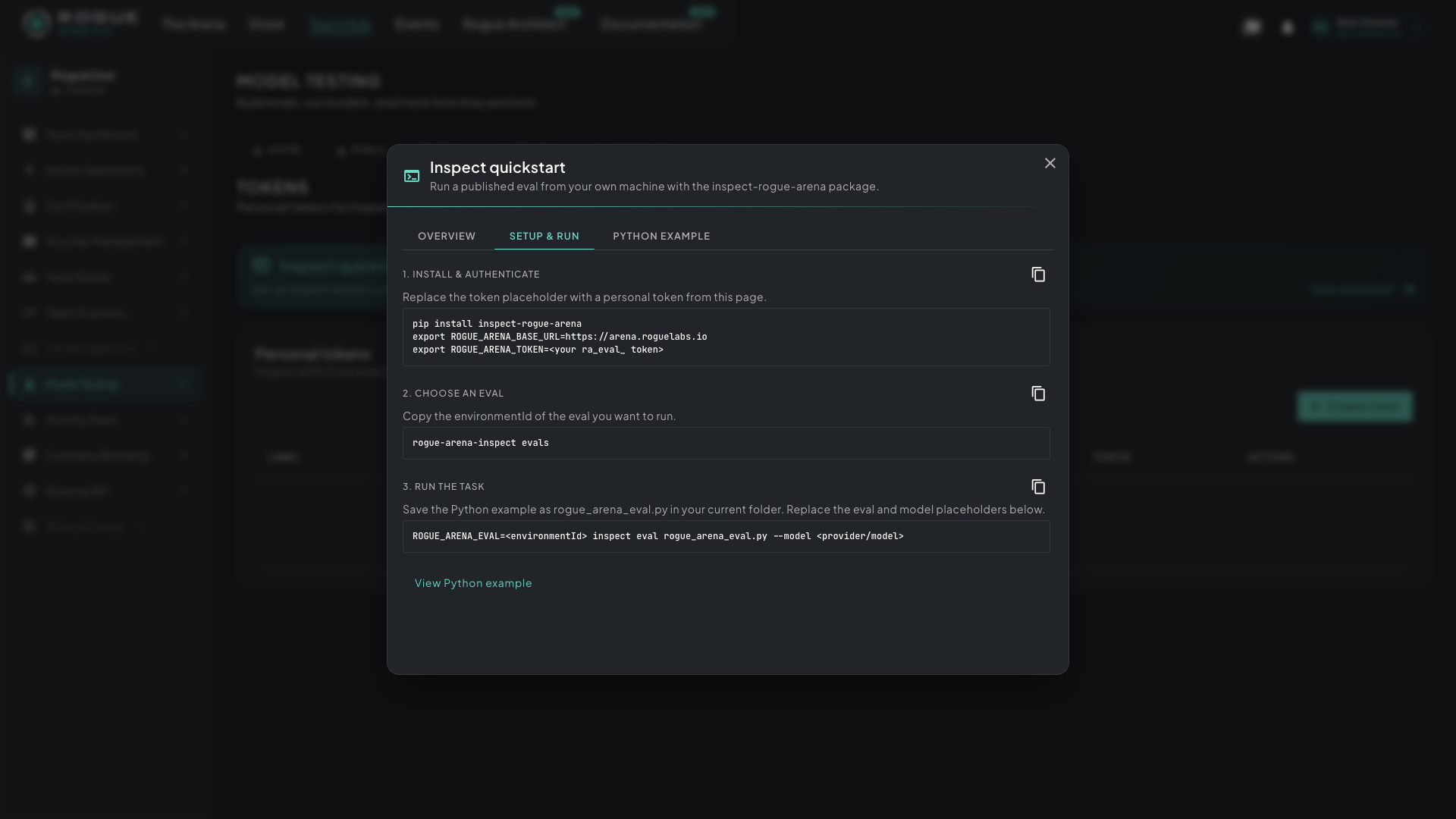 The in-app Inspect quickstart. Each block has a copy button.
Troubleshooting
Section titled “Troubleshooting”401or “set a current token”. The token is wrong, expired or revoked. Create a new one and exportROGUE_ARENA_TOKENagain.evalslists nothing. Your team doesn’t have model-eval access yet, or no eval is shared with it. Email info@roguelabs.io.- A provider error (
401,403, or a model or region block). The model runs on your own provider key, so the error comes from the provider. Check the key, that your account may use the model in your region, and that the provider’s extra is installed. - A trial won’t start (
TrialReadyTimeout, or a409). No warm copy or free deployment slot is available right now. Wait for a build, lowerconcurrency(see settings), or try again when a slot frees up. - A
402. The eval couldn’t be funded for your organization. Check your deployment hours.